Delivery From Payment to In-Game Pack
Delivery on a Whiteout Survival order is published as usually 10–30 minutes once the details are in, and the clock starts at payment rather than at the moment you open the form. The $99.99 rung is priced at $85.99, so the pack is worth choosing carefully — but the wait is decided by the queue, not by the size of the order.

Key takeaways
- Payment confirmed starts the window; the page publishes usually 10–30 minutes once the details are in.
- The order is a login top-up: KeyGold signs in with your login method and buys the pack inside the game.
- Afterwards the store says it signs out and clears the login history on its side, so change your password.
- Status stays visible in the Order Record, a confirmation email follows completion, and live chat is staffed 24/7.
The five steps between paying and receiving
A top-up order looks like one action from the outside and five from the inside. Once payment clears, the order enters a queue; the details are checked against the account; the pack is bought in the game shop while somebody is signed in; the session is closed and the login history cleared on the store's side; and the completion email goes out. Knowing the shape of that sequence makes the wait easier to read, especially when it reaches the slow end of the window.
What the buyer does during those five steps is deliberately small: nothing in game, nothing on the order form, and a passing glance at the Order Record if curiosity wins. The published advice is to stay out of the game for the duration, and it is the one instruction in the process that has a deadline attached to it.
The order of events, step by step
The table repeats the same sequence with the field or screen each step touches. It is the published process rather than an approximation of it.
| Step | What happens | Where it shows |
|---|---|---|
| 1 | Payment confirmed, order queued | Order Record |
| 2 | Login method and details checked | Order chat, if a field is missing |
| 3 | Pack bought inside the game | Your account, in game |
| 4 | Sign-out and login history cleared | Nothing required from you |
| 5 | Order completes | Confirmation email |
Why the pack is bought rather than the tokens
Whiteout Survival orders buy the pack itself. Frost Stars convert at face value — a dollar in, a dollar of pack out — so a token route would add a step without changing what the pack costs, and the store does not sell Frost Star top-ups at all. The purchase happens inside the game shop, on the account, which is also why a login method is requested: Facebook or Google, whichever the account actually uses.
That detail is where most delays begin. An account created through one provider and ordered through the other will not be signed into successfully, and the published warning about sessions applies for the same reason: the store is signed in while the pack is bought, so a second session from your side interrupts the transaction rather than speeding it up.
The ladder the chart prices
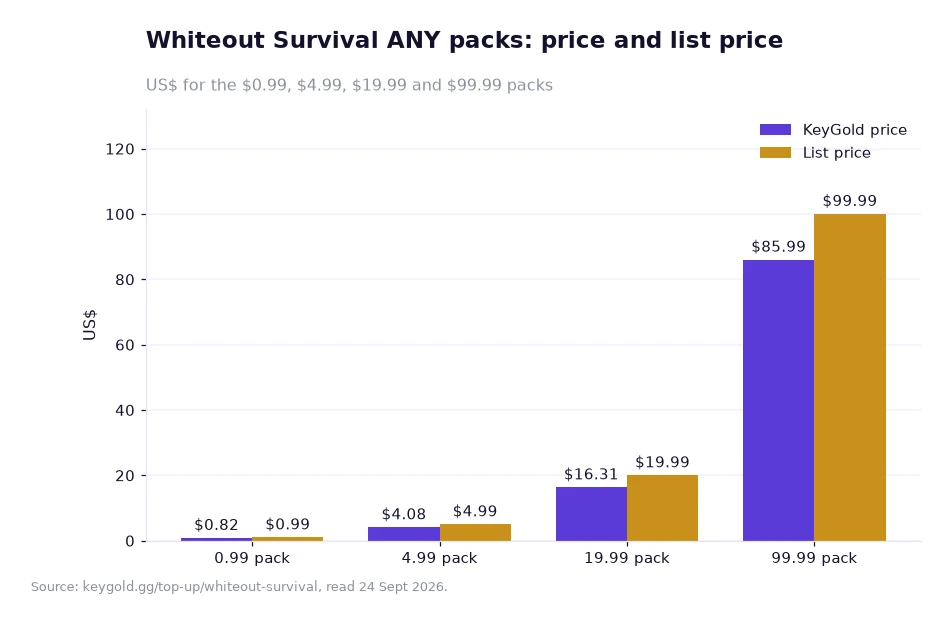
The chart on this page plots four rungs of the ANY ladder as published: the $0.99 pack at $0.82, the $4.99 pack at $4.08, the $19.99 pack at $16.31 and the $99.99 pack at $85.99, each beside its face value. Read it as a queue-independent picture of what a pack costs, because the clock and the price move for different reasons.
Waiting longer does not raise the price, and buying a larger rung does not shorten the wait. The only variable that touches both is a missing detail on the form: a wrong login method or an unanswered question in the order chat pushes an order towards the slow end while leaving every figure in the chart untouched.
A worked example: a payment at 21:00
My own arithmetic on the published window and the published ladder, with the assumptions stated.
- Assumption one: the window runs from confirmed payment, usually 10 minutes at the fast end and 30 at the slow end.
- Assumption two: the details are complete when the order is submitted, so no chat message is needed.
- Step one: payment confirmed at 21:00 gives the earliest finish at 21:10 and the latest at 21:30.
- Step two: the spread is 21:30 − 21:10 = 20 minutes, and a mid-point estimate is about 21:20.
- Step three: on price, the $999.99 rung is listed at $949.99, so $949.99 ÷ $999.99 = about 95 cents per dollar of face value.
- Step four: two $99.99 rungs cost $85.99 × 2 = $171.98 and carry $99.99 × 2 = $199.98 of face value.
The time figures come from the page and the money figures come from the ladder; the combination is mine, and both halves exclude things outside the page. The example leaves out the new-user coupon of 15%, valid 30 days with no threshold, and leaves out any bank conversion fee when the payment is made in another currency. It also assumes the pack is available in the game shop for the account at the time of purchase.
What to have ready, and when to ask
Have the login method, the account and the password ready before paying, and keep the game closed until the confirmation email arrives. If half an hour passes with no update, the order chat is the right place to ask, because the status there is the same one the store sees — the page rates itself 4.9 from 811 evaluations, with 96.5% of those ratings at five stars, and publishes an 18% discount for this game.
Anyone who prefers to read the whole route before committing can start with the top-up index, which lists the titles and their published windows, or the games page, which sets out what each order needs at the form. The store blog covers the same ground in shorter posts. A first-time buyer can also read the whiteout survival frost star buy page end to end and arrive at checkout with every field already answered.
One small decision is worth making before the order rather than after it: how large a rung you want. The ladder rewards a bigger face value with a slightly better rate, but it also produces a bigger purchase, and the published face-value rule means the size of the pack is the size of the spend. Buyers who order a rung they will not use within the month have paid for convenience rather than for value, which is a legitimate choice but an expensive default.
Frequently asked questions
How long from payment to the pack being in my account?
The page publishes usually 10–30 minutes once the details are in. Processing is a login top-up: the store signs in with the login method the account uses, buys the pack inside the game, then signs out and clears the login history on its side. Live chat is staffed 24/7 throughout.
Where can I follow the order while it is running?
The Order Record shows the status at any time, and a confirmation email follows once the order completes. Keep the game closed while processing runs, and use live chat rather than logging in if you need an update, because the details are verified against the account rather than through the game client.
Handling the wait without touching the game
Submit the order with the right login method, close the game, and check the Order Record instead of the launcher. That is the whole discipline: the published window is usually 10–30 minutes once the details are in, and every minute saved comes from a complete form rather than from watching the process. If the wait passes the slow end, ask in live chat with the order number to hand, and change your password once the pack has landed.
The delivery window, the order flow, the ANY pack ladder, the discount figure and the rating quoted above come from KeyGold's own pages, read 24 Sept 2026. [1]